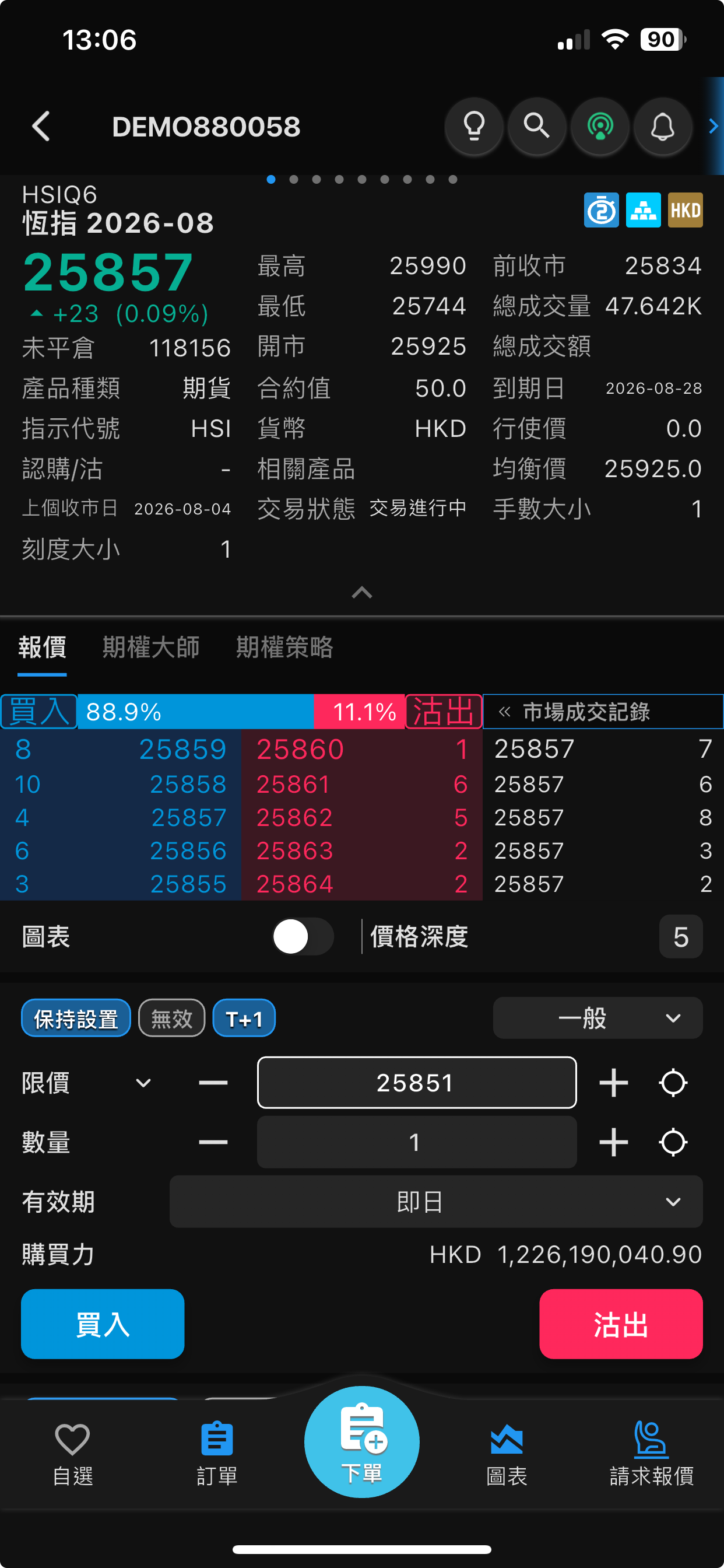
1. System Login & Connection Settings
Welcome to Sharp Point System. Please follow the instructions to connect to the server and secure your login.
1. 系統登入與連線設定
歡迎使用 Sharp Point 交易系統。在開始交易前,請跟隨步驟完成伺服器連線與安全登入。
1. 系统登录与连线设定
欢迎使用 Sharp Point 交易系统。在开始交易前,请跟随步骤完成服务器连线与安全登录。
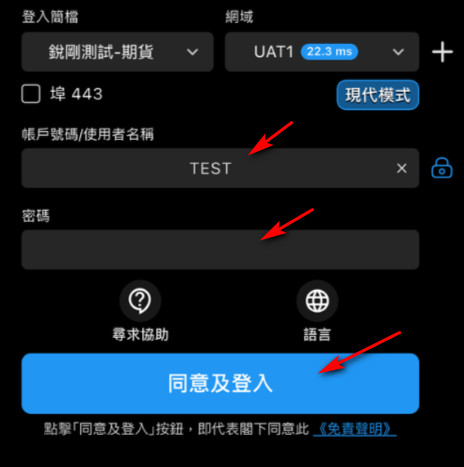
2. Market Data
The system offers various product quotes. You can freely filter through different product quotes in the market overview.
2. 查看市場數據
系統提供不同的產品報價。您可以在市場概覽中自由篩選不同的產品報價。
2. 查看市场数据
系统提供不同的产品报价。您可以在市场概览中自由筛选不同的产品报价。
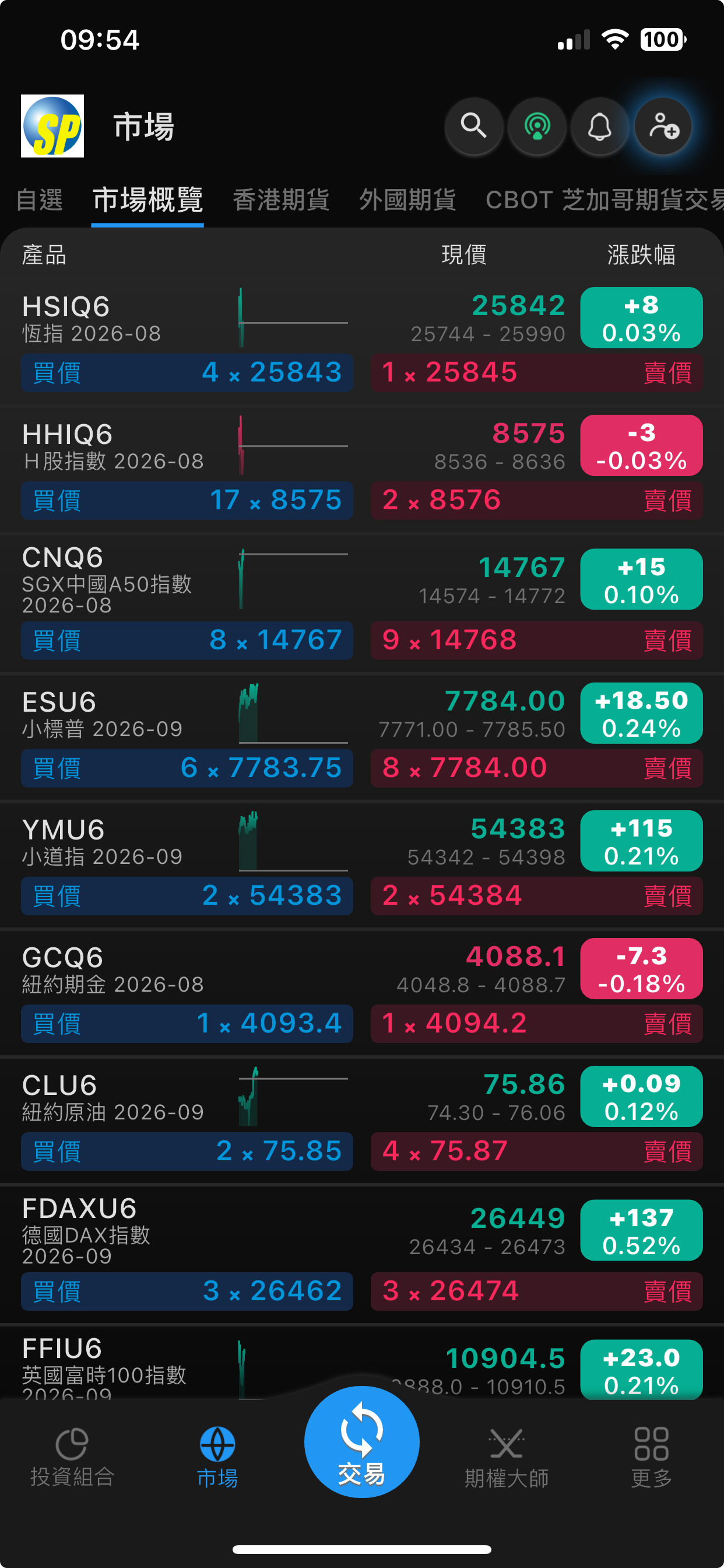
3. Portfolio and Account Overview
帳戶選擇 顯示當前登入之經紀/客戶名稱及帳戶編號。
眼睛圖示 (👁️):點擊可隱藏或顯示敏感的資產金額數字,保護個人隱私。
設定圖示 (⚙️):調整投資組合頁面的顯示偏好設定。
現金結餘 (多幣別明細) - 系統支援多幣別資產管理,會在中間區塊列出各貨幣的實際金額及折合總計
下方頁籤功能 (持倉與交易紀錄) - 透過中間的頁籤,可切換查看詳細的交易狀態:
3. 投資組合與帳戶概覽
帳戶選擇 顯示當前登入之經紀/客戶名稱及帳戶編號。
眼睛圖示 (👁️):點擊可隱藏或顯示敏感的資產金額數字,保護個人隱私。
設定圖示 (⚙️):調整投資組合頁面的顯示偏好設定。
現金結餘 (多幣別明細) - 系統支援多幣別資產管理,會在中間區塊列出各貨幣的實際金額及折合總計
下方頁籤功能 (持倉與交易紀錄) - 透過中間的頁籤,可切換查看詳細的交易狀態:
3. 投资组合与帐户概览
帳戶選擇 顯示當前登入之經紀/客戶名稱及帳戶編號。
眼睛圖示 (👁️):點擊可隱藏或顯示敏感的資產金額數字,保護個人隱私。
設定圖示 (⚙️):調整投資組合頁面的顯示偏好設定。
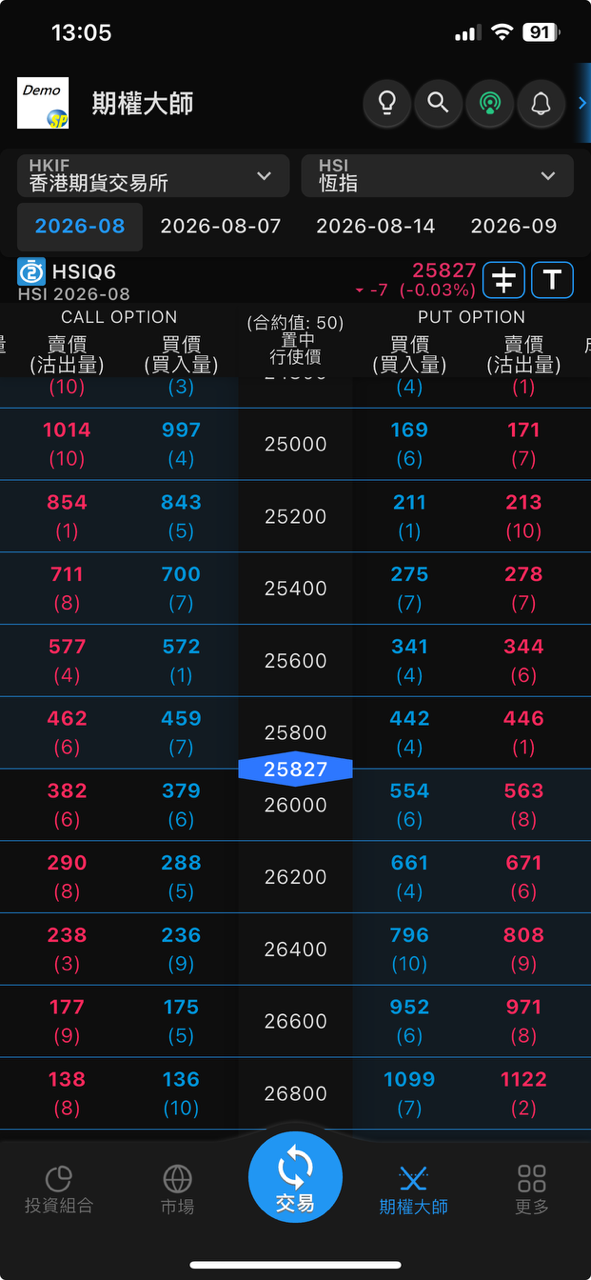
4. Option Master
greatly facilitating portfolio investment, dynamic hedging, and risk management, etc.
Market and Underlying Asset Selection: Supports selection of exchange (e.g., HKIF Hong Kong Futures Exchange) and underlying asset (e.g., HSI Hang Seng Index).
Expiration Date Label: Supports switching between monthly contracts (e.g., 2026-08) and periodic options contracts (e.g., 2026-08-07).
Real-time Index Information: Displays the current underlying futures code (e.g., HSIQ6), current price (25827), and percentage change.
T-Option Chain Data Interpretation
Central Column (Strike Price): Clearly indicates the contract value ($50 per point),
and highlights the current underlying index position (25827) with a blue arrow, facilitating judgment of in-the-money/out-of-the-money/equivalent.
Quick Trading Process
Clicking the corresponding buy/sell price and quantity block will input parameters and quickly bring up the order confirmation interface.
4. 期權大師
大大方便投資者作組合投資、動態對沖、以至風險管理...等等。
市場與標的選擇:支援選擇交易所(如 HKIF 香港期貨交易所)及標的商品(如 HSI 恒指)。
到期日標籤列:支援切換月合約(如 2026-08)與週期權合約(如 2026-08-07)。
即時指數資訊:顯示當前標的期貨代碼(如 HSIQ6)、現價(25827)與漲跌幅。
T型期權鏈 (T-Option Chain) 數據解讀
中央欄(行使價 Strike Price):清楚標示合約值(每點 $50),
並以藍色箭頭突出顯示當前標的指數位置(25827),方便判斷價內/價外/等價。
快捷交易流程
點擊相應的買賣價格與數量區塊,系統即可帶入參數並快速喚起下單確認介面。
4. 期权大师
大大方便投资者作组合投资、动态对冲、以至风险管理...等等。
市场与标的选择:支援选择交易所(如 HKIF 香港期货交易所)及标的商品(如 HSI 恒指)。
到期日标签列:支援切换月合约(如 2026-08)与周期权合约(如 2026-08-07)。
即时指数资讯:显示当前标的期货代码(如 HSIQ6)、现价(25827)与涨跌幅。
T型期权链 (T-Option Chain) 数据解读
中央栏(行使价 Strike Price):清楚标示合约值(每点 $50),
并以蓝色箭头突出显示当前标的指数位置(25827),方便判断价内/价外/等价。
快捷交易流程
点击相应的买卖价格与数量区块,系统即可带入参数并快速唤起下单确认介面。
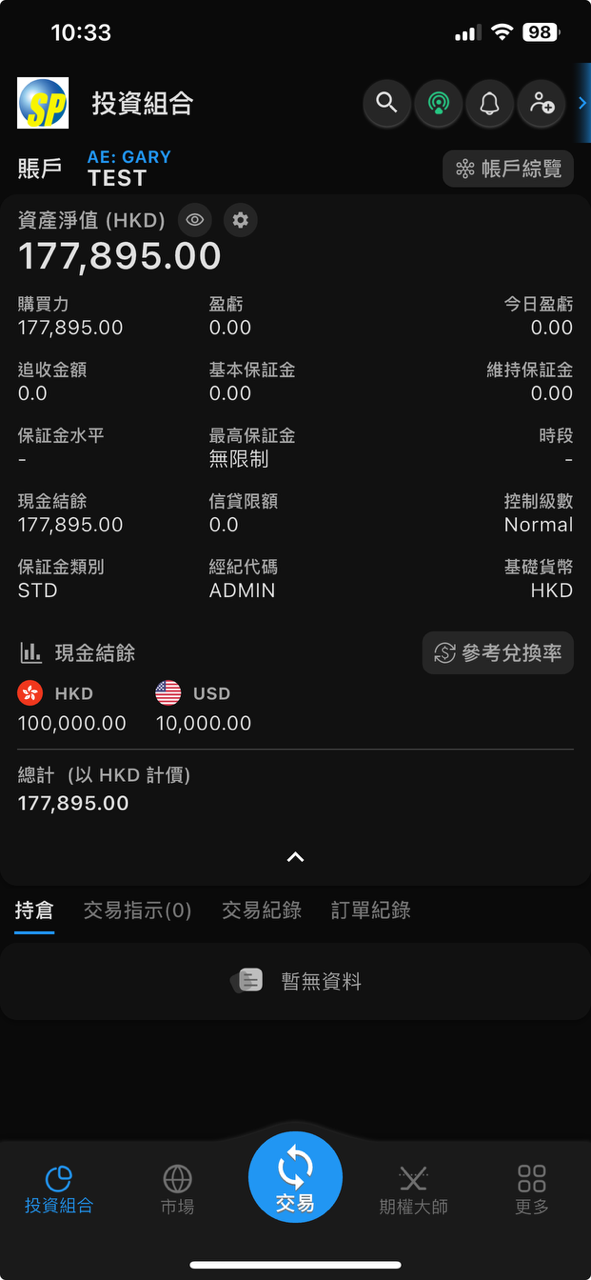
5. Order Function
Trading settings offer quick switching between Keep Settings, Invalidate, and T+1 for convenient participation in night trading.
Functional Modules Detailed Description
Buying and Selling Strength Indicator: The horizontal ratio column displays the current market order strength. For example: Buy 88.9% vs. Sell 11.1%.
Five-Level/Ten-Level Quotes: The blue numbers on the left represent buy orders (Bid), and the red numbers on the right represent sell orders (Ask).
Displays the best bid and ask prices and corresponding order quantities, such as buy order 25859 (8 contracts) and sell order 25860 (1 contract).
Market Transaction Records: A separate column on the right scrolls to display the latest transaction prices and quantities, facilitating tracking of large order movements.
Order Type: The default is "Limit" order. Clicking the drop-down menu allows you to change it to a market order or other advanced conditional orders.
Price and Quantity Adjustment:
Fine-tune the price and lot size using the + / - buttons.
Validity Period: Default is "Day".
Purchasing Power Display: Available funds (purchasing power) in your account will be displayed in real-time above the order button.
Execute the Trade: After confirming the parameters are correct, click the blue "Buy" button on the left to establish a long position/close a short position,
or click the red "Sell" button on the right to establish a short position/close a long position.
The system will confirm and send the order according to your settings.
5. 下單功能
交易設定提供: 保持設置、無效、T+1 的快捷切換,方便參與夜期交易。
功能模塊 詳細說明
買賣力道指標 橫向比例列顯示當前市場委託的買賣強弱。例如:買入 88.9% 對比 沽出 11.1%。
五檔/十檔報價 左側藍色數字為買盤 (Bid),右側紅色數字為賣盤 (Ask)。
顯示最佳買賣價及對應的掛單數量,如買盤 25859 (8張)、賣盤 25860 (1張)。
市場成交記錄 右側獨立欄位,滾動顯示市場最新逐筆成交的價格與張數,方便追蹤大單動向。
訂單類型: 預設為「限價 (Limit)」單,點擊下拉選單可更改為市價單或其他進階條件單。
價格與數量調整:
透過 + / - 按鈕微調價格與手數。
有效期: 預設為「即日 (Day)」
購買力顯示: 下單按鈕上方會即時顯示帳戶可用資金 (購買力)。
執行交易: 確認參數無誤後,點擊左側藍色 「買入」 建立好倉/平淡倉,
或點擊右側紅色 「沽出」 建立淡倉/平好倉。
系統會根據您的設定進行確認送出訂單。
5. 下单功能
交易设定提供: 保持设置、无效、T+1 的快捷切换,方便参与夜期交易。
功能模块 详细说明
买卖力道指标 横向比例列显示当前市场委托的买卖强弱。例如:买入 88.9% 对比 沽出 11.1%。
五档/十档报价 左侧蓝色数字为买盘 (Bid),右侧红色数字为卖盘 (Ask)。
显示最佳买卖价及对应的挂单数量,如买盘 25859 (8张)、卖盘 25860 (1张)。
市场成交记录 右侧独立栏位,滚动显示市场最新逐笔成交的价格与张数,方便追踪大单动向。
订单类型: 预设为「限价 (Limit)」单,点击下拉选单可更改为市价单或其他进阶条件单。
价格与数量调整:
透过 + / - 按钮微调价格与手数。
有效期: 预设为「即日 (Day)」
购买力显示: 下单按钮上方会即时显示帐户可用资金 (购买力)。
执行交易: 确认参数无误后,点击左侧蓝色 「买入」 建立好仓/平淡仓,
或点击右侧红色 「沽出」 建立淡仓/平好仓。
系统会根据您的设定进行确认送出订单。